Themes
Ten themes ship with Grimoire. Every one defines a light and a dark palette - that is not optional in the theme model, so no theme can render a broken dark mode - plus a type stack, a corner radius, and the measure of the text column.
grimoire themes                  # the list, with one line each
grimoire build --theme nordic # try one without editing the config[html]
theme = "nordic"
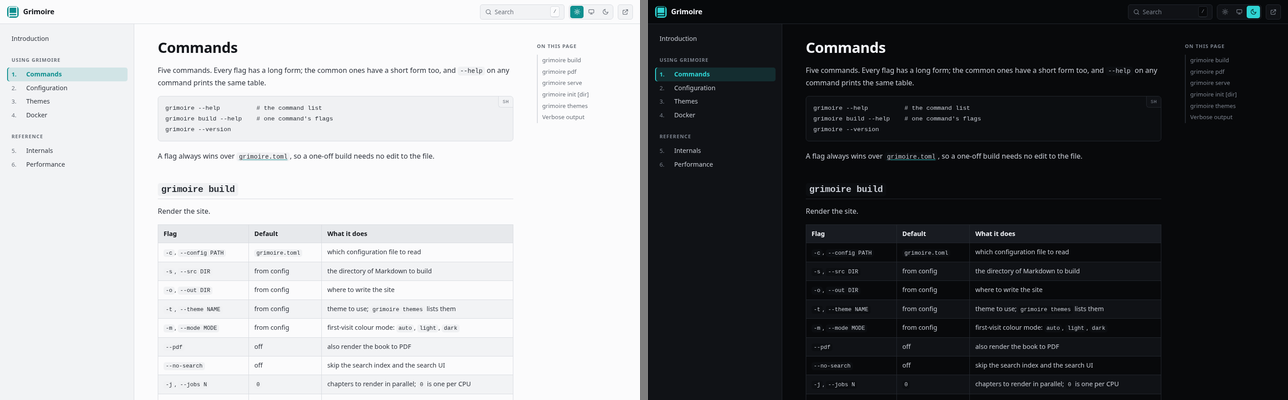
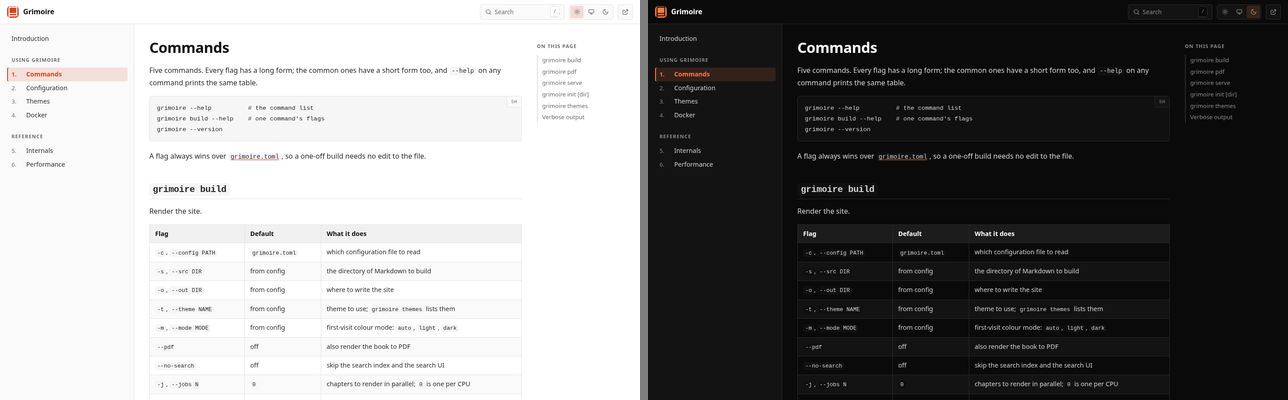
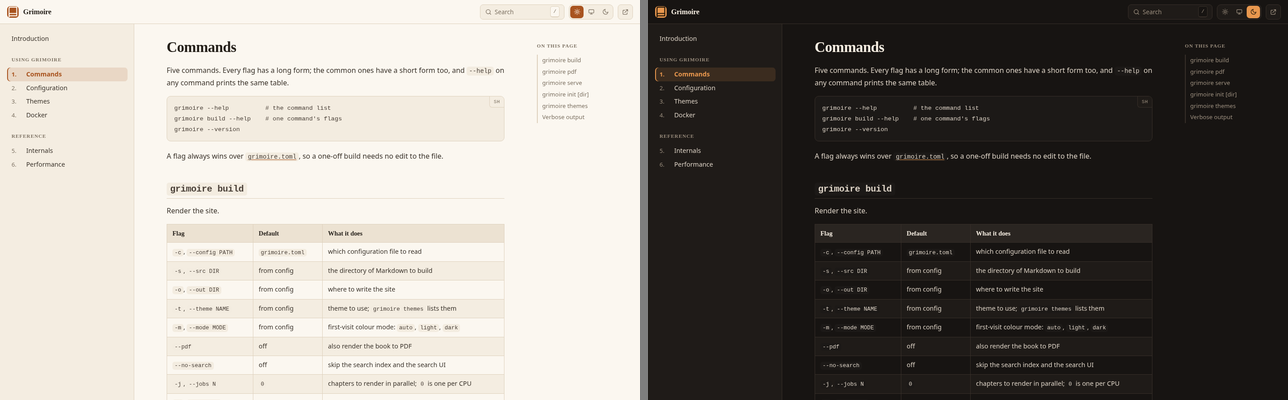
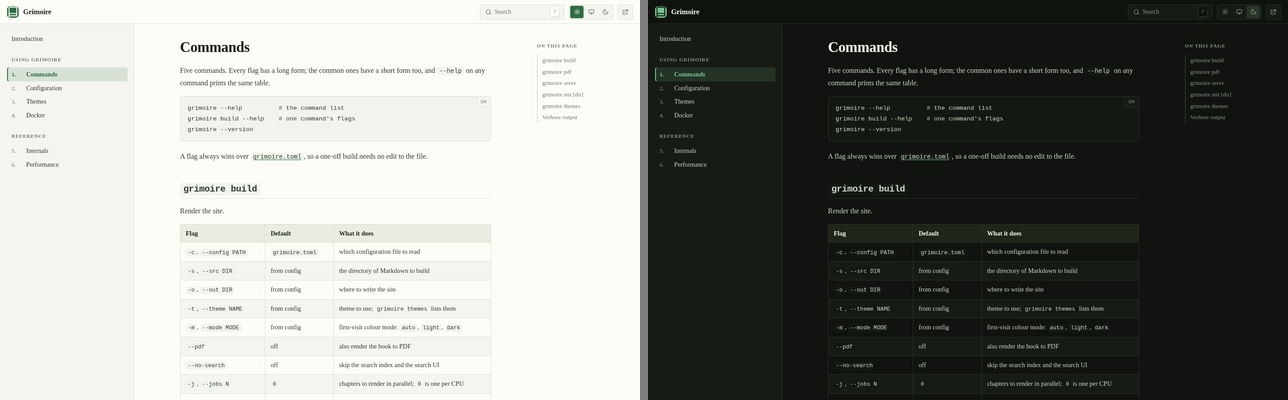
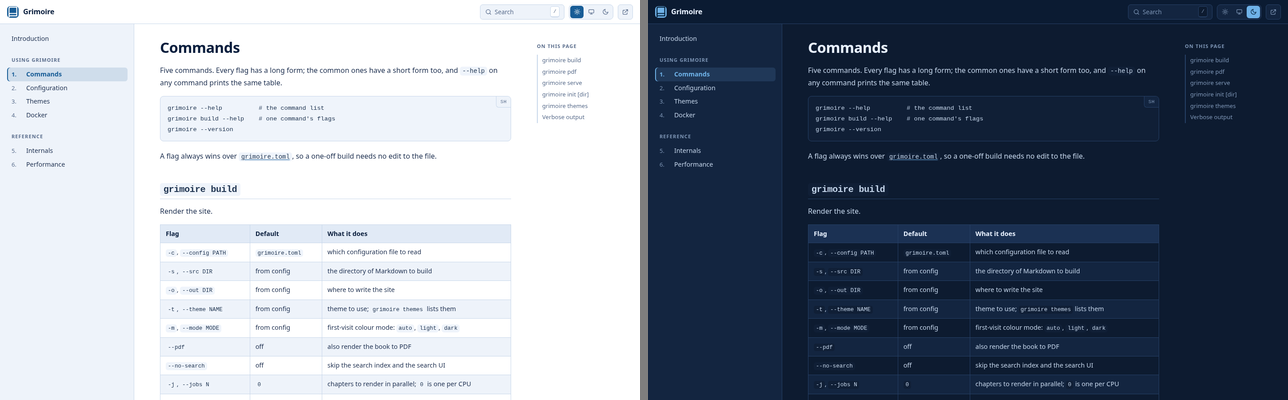
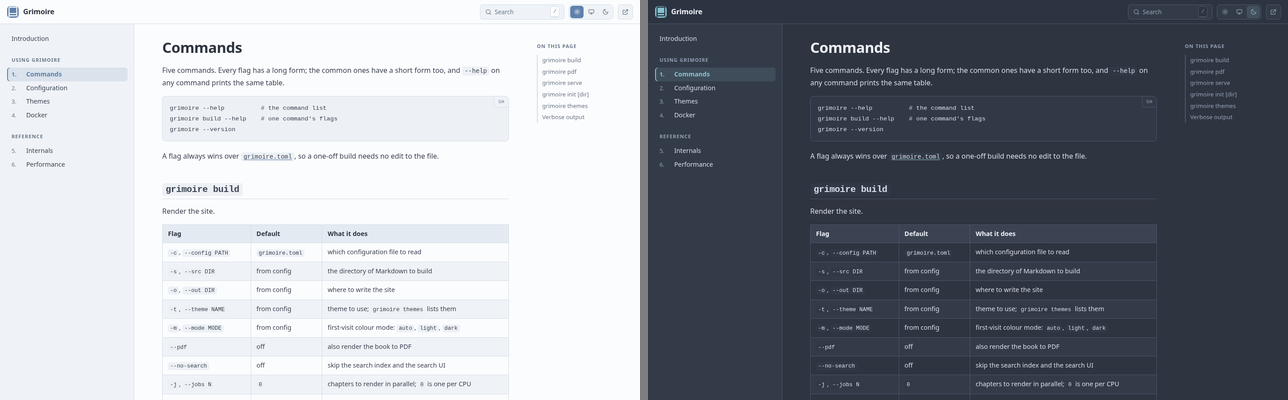
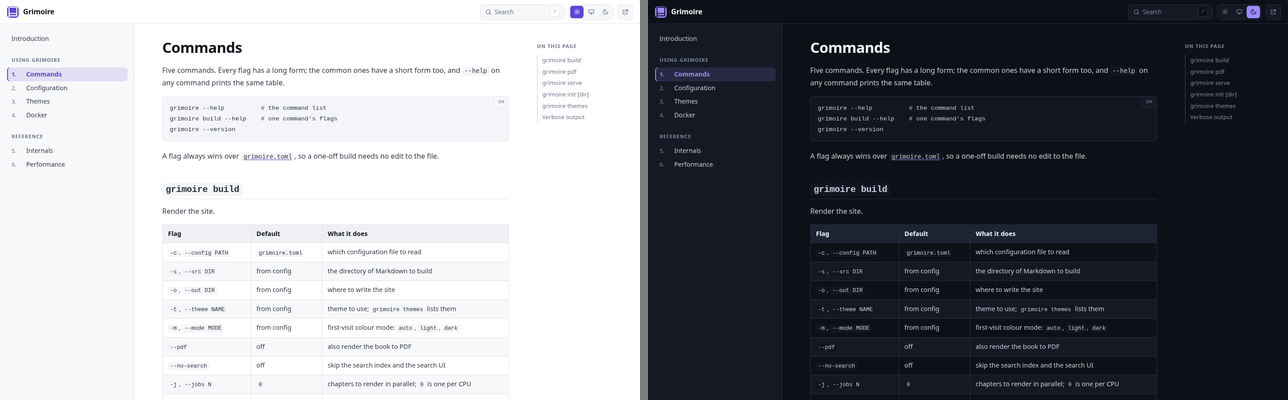
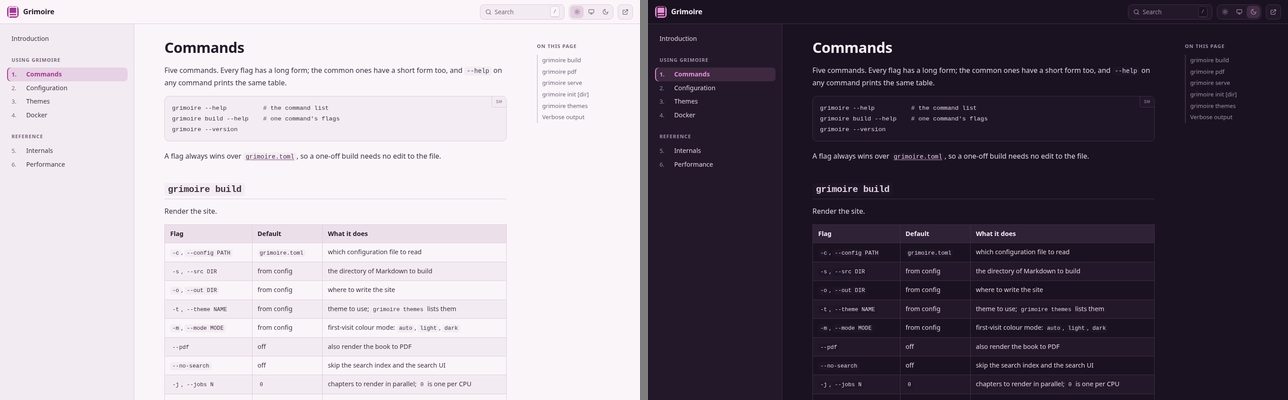
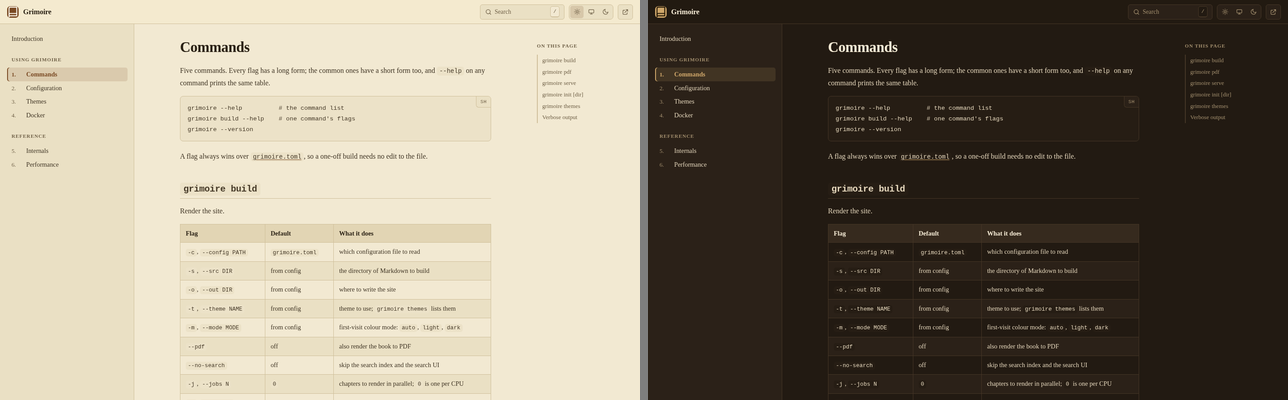
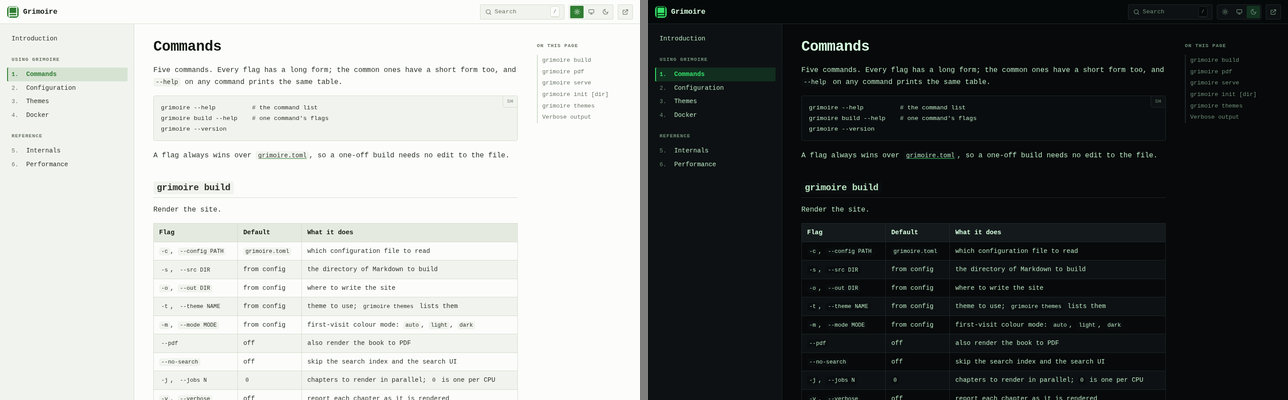
mode = "auto" # what a first-time reader gets: auto | light | darkEach screenshot below is the same page of this manual - the command reference, light on the left and dark on the right - captured at 1440px wide, where the three-column layout is showing. Regenerate them all with scripts/screenshots.sh.
The gallery
Alphabetically. grimoire is the default; the rest are equals.
carbon
Graphite and teal, designed dark-first: the dark palette came first and the light one is its inverse rather than the other way round. Built for long technical reference.
ember
High-contrast neutral with an orange accent, near-square corners, and the widest measure at 860px - the most screen-native of the ten.
grimoire
Warm parchment and ink with a rust accent, and the only theme with serif headings over a sans body. The default.
ivy
Cream paper and forest green, with a serif body and a narrow 700px measure. The one to pick when the book is mostly prose.
meridian
Deep navy ink on a white page, blue-tinted panels, a dark steel-blue accent, and a navy dark mode. The product-handbook register: sober, corporate, unfussy.
nordic
The Nord palette - arctic blue-greys, a frost-blue accent, and a dark mode that is deliberately not black. Low glare and very even contrast, which suits reading for an hour more than it suits a screenshot.
obsidian
Cool slate with a violet accent, sans throughout. The dark mode is the one this theme is really about.
orchid
Mauve-tinted paper with a violet-pink accent, a plum dark mode, and the roundest corners of the set. Friendly and light.
sepia
Yellowed paper and deep coffee brown, full serif. The gentlest of the ten on a bright screen, and the only one whose dark mode is dark brown - old leather rather than the near-black the others use.
terminal
Monospace everywhere, phosphor green on near-black, corners almost square. A console in a browser.
At a glance
| Theme | Body | Headings | Radius | Measure |
|---|---|---|---|---|
carbon | sans | sans | 5px | 800px |
ember | sans | sans | 3px | 860px |
grimoire | sans | serif | 7px | 760px |
ivy | serif | serif | 4px | 700px |
meridian | sans | sans | 6px | 790px |
nordic | sans | sans | 6px | 780px |
obsidian | sans | sans | 6px | 780px |
orchid | sans | sans | 8px | 770px |
sepia | serif | serif | 5px | 700px |
terminal | mono | mono | 2px | 820px |
The PDF follows the theme
The printable book is themed too. Heading bars and the table header band are drawn from the selected theme's light palette - paper is white, so the dark palette would print as slabs of toner - with heading bars taking the accent mixed toward white, deepest at level one. So terminal prints with green heading bars and sepia with brown ones, and the hierarchy still reads at a glance.
How a theme is built
A theme is one file under src/themes/, and it is almost entirely a colour table. The layout rules live in a single constant stylesheet that only ever reads var(--gr-*) custom properties, so a theme never restates a rule - it supplies values.
export func theme() {
    return palette.Theme{
        name: "nordic",                       # the value for html.theme
        label: "Nordic",
        description: "Arctic blue-grey ...",  # the line `grimoire themes` prints
        light: palette.palette(...),          # fourteen colours
        dark: palette.palette(...),           # fourteen more
        fontBody: palette.sans(),
        fontHeading: palette.sans(),
        fontMono: palette.mono(),
        radius: 6,
        contentWidth: 780
    };
}
contentWidth is the only width a theme sets. The two beside it - the book contents on one side, the page contents on the other - are not a matter of taste, so they are fixed in palette.j for every theme, and they grow with the viewport:
| narrow | wide | |
|---|---|---|
| book contents | 302px | up to 400px |
| on this page | 232px | up to 340px |
Both columns hold titles, and a title is as long as it is. At a fixed width the only thing that gives is the line count, so a page with headings like "Immutability, yanking, and deletion" wraps nearly every row and a list meant to be scanned at a glance reads as a paragraph. Below about 1590px nothing has changed - the old fixed widths are the floor - and above it the columns take their share of the room a large screen has going spare.
The shell as a whole is still capped, at 1886px, which is both columns at their widest plus the roomiest measure any theme asks for. Uncapped, the two columns end up pinned to the far edges of a wide monitor with the text stranded in the middle, and a contents list is only useful beside the thing it lists.
palette.palette is positional, taking the fourteen colours in the order the Palette struct declares them, which keeps a theme file readable as a table:
| # | Field | What it paints |
|---|---|---|
| 1 | bg | the page background |
| 2 | surface | raised surfaces: sidebar, code blocks, cards |
| 3 | surfaceAlt | hover and zebra-stripe fills |
| 4 | border | hairline rules and outlines |
| 5 | text | body text |
| 6 | muted | secondary text: captions, breadcrumbs, metadata |
| 7 | heading | heading text |
| 8 | accent | links, the active chapter, focus rings |
| 9 | accentHover | the accent under a pointer |
| 10 | onAccent | text drawn on an accent fill |
| 11 | codeText | code text |
| 12 | codeBg | inline-code and code-block background |
| 13 | selection | the text-selection highlight |
| 14 | shadow | the shadow colour, including its alpha |
Any CSS colour notation works; the shipped themes use hex for opaque colours and rgba() for selection and shadow.
Two sets of colours sit outside a theme's palette, for the same reason the two side columns do:
--gr-syn-* | the code tokens: one pair tuned to read on both a warm parchment and a cool slate, which beats ten hand-tuned sets and is one place to fix |
--gr-adm-* | the admonitions: a warning is amber in every book or it is not a warning. Each fill is its hue at low alpha, so it composes with whatever the theme put behind it |
A theme does not have to know either exists. To use different values, redefine the properties in a <style> block in html.footer, which is emitted verbatim and lands after the theme's stylesheet. Match the selectors the sheet uses: the dark values sit under :root[data-theme="dark"] and inside a prefers-color-scheme block, both of which outrank a bare :root, so an override written only for :root applies in light mode alone.
Three font helpers - palette.sans(), palette.serif(), palette.mono() - return stacks that each end in a generic family, so a machine with none of the named faces still renders the intended shape. A theme is free to pass its own stack string instead.
Adding one
- Copy an existing file in
src/themes/and fill in the two palettes. importit insrc/theme.jand addyours.theme()toall().
That is the whole registration. grimoire themes, the --theme flag, the config validation, and the PDF colours all read from all(), so nothing else needs to hear about it.
jennifer fmt --write src/themes/yours.j
bin/grimoire build --theme yoursRegenerating the gallery
scripts/screenshots.sh rebuilds every image in docs/screenshots/:
scripts/screenshots.sh              # all ten
scripts/screenshots.sh nordic ivy   # just these
It needs chromium, ImageMagick, and a Jennifer interpreter on PATH (override with CHROMIUM, MAGICK, JENNIFER). The book is built once, because the HTML is identical for every theme - only assets/grimoire.css differs, so the loop swaps the stylesheet with scripts/theme-css.j rather than running ten builds. Each theme is then captured twice, with the colour mode pinned in localStorage before the first paint, and the pair is composited side by side.
PAGE, SRC, OUT, and the four size variables at the top of the script override the defaults, so pointing the gallery at a different page or a different book is a variable, not an edit:
PAGE=index.html SRC=docs OUT=/tmp/shots scripts/screenshots.sh grimoire